Use Bosbec to convert API requests to suit your system
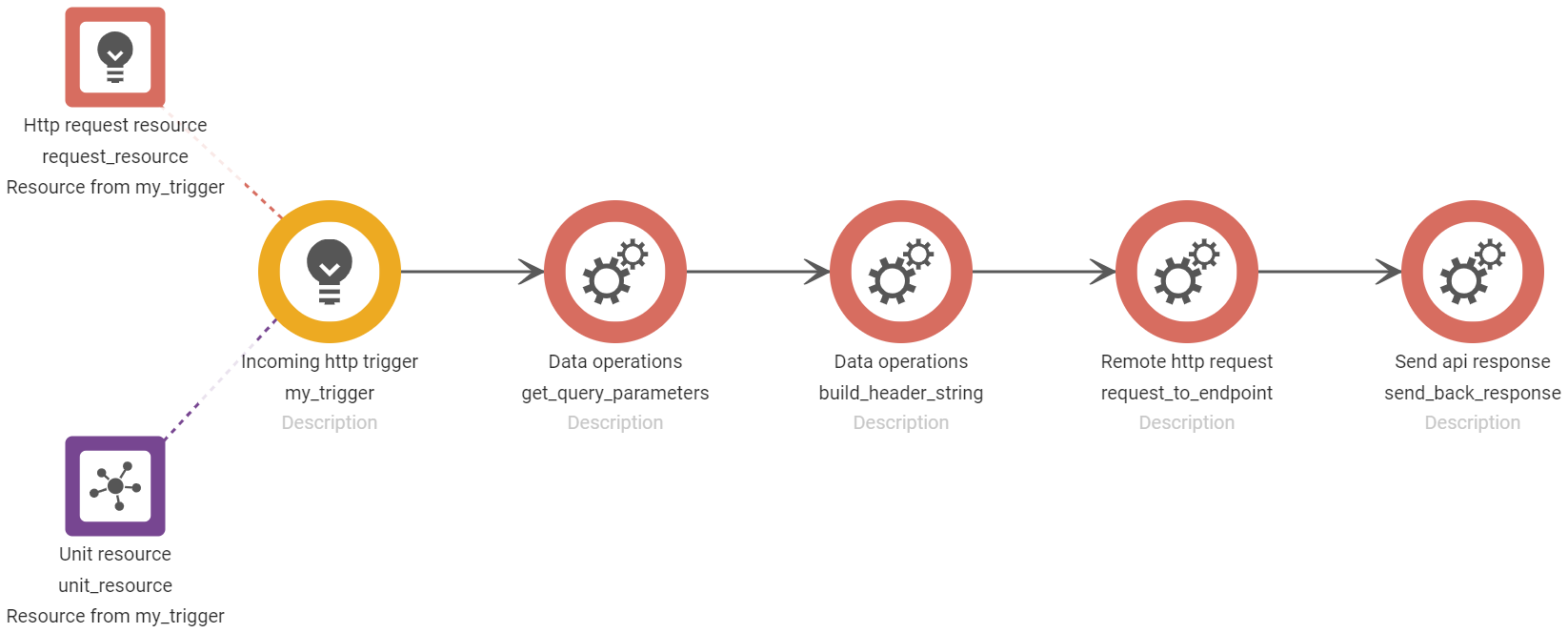
To say that APIs, Application Programming Interface, is a vital component in any modern application isn’t exactly going out on a limb. The way today’s websites and systems communicate with each other and let users almost effortlessly access a vast amount of information, all thanks to APIs, is very much appreciated.An API is a software intermediary between two software programs, and even though APIs are getting standardized in terms of accessibility (HTTP and REST), the use case can still differ in how a system makes the request.This accessibility difference can turn out to be difficult and time-consuming when adapting your system to suit an API endpoint. This, rather surprising headache, can occur in different ways, and rebuilding your HTTP request to a REST request might not be what you’d want to spend your resources on.With the Bosbec Workflow Builder, you can keep your source code the way it is and communicate with your API endpoint regardless of any request requirements. Bosbec WE (Workflow Engine) acts as a gateway and converts your API request to be accessible to the endpoint. The Workflow Builder is a low-code development platform that, in its definition, requires minimal to no coding knowledge and lets users create their own IT solutions, one of which could be your custom-tailored API converter.One example of this conversion is when your system sends a request via an URL, but your endpoint is a bit pickier than that and requires specific parameters as request headers or in the request body. Coincidentally enough, this scenario is simplified in the Workflow Builder in this blog post.The Workflow Builder consists of several triggers and jobs which makes it possible to react to events, modify data and send data. In this case, we want to react to an incoming web URL request and send a detailed REST request to the endpoint. In this scenario, our system wants to make a request to an external API to get a live weather report in a certain city, the input of the request. As it happens, the input has to be in the form of a header instead of a query parameter. Rest assured, the system can still send the request in a web URL format, we’ll let the Workflow Builder take care of the rest.
The API converter workflow
Our workflow will react on a web URL request from our system which contains the parameter “city”, and in this case, we want to find out what the weather’s like in Stockholm. The URL request to the workflow builder looks like this:
https://in.bosbec.io/2/178db68d-e3c3-4576-8f3f-49e624ce9aa7?city=Stockholm.With the “Data Operations”-job we can extract the input from the web URL request and set it as a header in the job “Remote HTTP request”. In this way, you can customize your input and data in any way you see fit, but it’s all initiated with a web URL. Once the request is built we can send it to the external weather application.
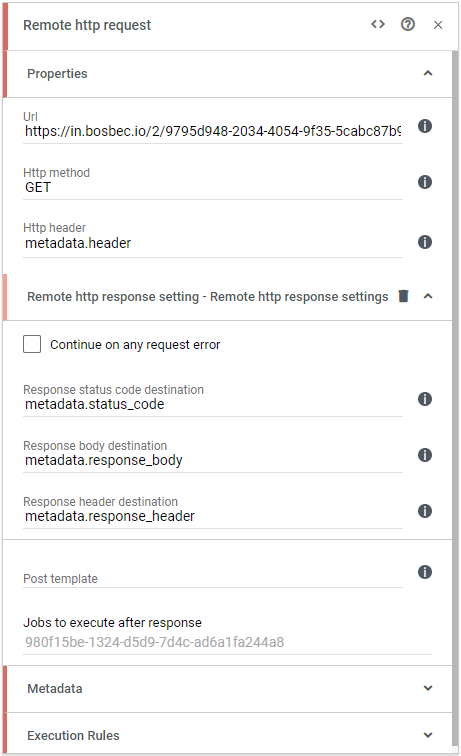
The job “Remote HTTP Request” which makes the request to the endpoint, triggered by a web URL
Once the workflow has received the response we want, we can return it to our system, and the chain of events is enclosed. The response is returned as a JSON body and contains details about the weather in Stockholm:{
"temperature_c": 20,
"rain_mm": 0,
"windspeed_mps": 5,
"airhumidity_perc": 53,
"airpressure_hpa": 1011
}Looks like a nice day to visit the capital!This example is just a fraction of what you can do in the workflow builder, so let your creativity surge and streamline your business! If you ever need help in your development or have questions about the Bosbec system, reach out to our support team who’d be happy to help.The example in this post is found in its detailed version in this PDF document: Convert API requests to suit your system.
This solution is based on the concept of developing in the low-code platform Bosbec Workflow Builder and react on Incoming Data and being able to create Outgoing Data. Click on the links to learn more.To learn about more jobs that are available in the Workflow Builder, look through our Documentation page, and see if you can find some interesting jobs that you might want to use!If you ever need help in your development or have any questions or concerns, do not hesitate to reach out to our support team at support@bosbec.com, and we’ll gladly help you in your development!
Services
Integrations
Connect Dstny PBX with Odoo CRM – the Flexible Way